Posts

Steps To Apply Content Gating In Sitecore
Image
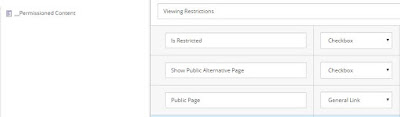
Gated content  is online materials such as white papers, articles, forms, and videos, that require that users fill out a form before they can access them or be authenticated to access them. In this Blog will implement Content Gating in Sitecore Page so if the user unauthenticated it will show restricted layout Step1 : Create a base template " __Permissioned Content" Template     Is Restricted – Checkbox     Show Public Alternative Page – Checkbox     Public Page – General Link Step 2 :  Create a Restricted device Step3 : Make your page template you want to apply the content gatting on it inherits from __Permissioned Content Template Step 4:   Assign your template presentation the render you want to show in the restricted mode to the restricted device Step 5: Create HttpModules to handle the restriction logic if the user is not Authenticated Step...
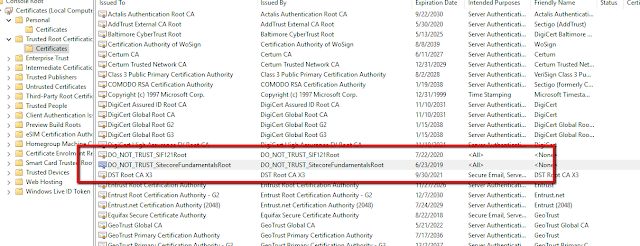
SIF Certificate Root expired

Image
this issue appear when I tried to install Sitecore 9.0.2 for the first time and it seems SIF  Certificate  is expired So I got this error    PS>TerminatingError(New-SelfSignedCertificate): "CertEnroll::CX509Enrollment::_CreateRequest: The time period is invalid. 0x80630705 (-2140993787 PEER_E_INVALID_TIME_PERIOD)" >> TerminatingError(New-SelfSignedCertificate): "CertEnroll::CX509Enrollment::_CreateRequest: The time period is invalid. 0x80630705 (-2140993787 PEER_E_INVALID_TIME_PERIOD)" >> TerminatingError(New-SelfSignedCertificate): "CertEnroll::CX509Enrollment::_CreateRequest: The time period is invalid. 0x80630705 (-2140993787 PEER_E_INVALID_TIME_PERIOD)" Install-SitecoreConfiguration : CertEnroll::CX509Enrollment::_CreateRequest: The time period is invalid. 0x80630705  (-2140993787 PEER_E_INVALID_TIME_PERIOD) At C:\Sitecore 9.0.2\Install.ps1:44 char:1 + Install-SitecoreConfiguration @xconnectParams + ~~~~~~~~~~~~~~~~~~~~~~~~~...

Using Sitecore Personalisation role with Cashing carefully

If you want to use personalization with cashing in render level you should be  careful because if you use chasing on the container level which has render used personalization role that this will affect the  personalization because  it depends on some cookies. which in case you use cashing it will not update. the below example will show you how that effect happen : if we have two pages Let say Homepage and Help page in our site  and in and a popup should appear in Help Page in case we visit Homepage first   we add personalization Role in the popup control to handle that  but what if the popup container control have cashed option as the personlization role will not be implemented correctly and it will depend on the first visit to the page  so if you open the help page first and then go back home and return to the help page the popup will not appear although the condition is achieved So, be careful when you...

WFFM Send Message BCC and CC issue

WFFM Send Message BCC and CC issue  If you use the Send Message action in web form marketer, and when we  tried to set multiple contact in the BCC value separated with ";" it keep just send the email to the last contact. This is a known issue in sitecore but they stop support fixes to this issue in old version So what if I have old version such as 7.1 update 1 we can resolved this issue with below solution. Overwrite  the GetMail method as below And use below custom pipeline configurations  

Sitecore 9 Update 2 Installation Guide Step by step

Image
Sitecore 9 Update 2 just released before couple of days. and in this post I will show you how to have a quick Sitecore installation on your machine. First Step: Prepare Folder that contain all the required package and Configurations  File  Create Folder C:\SitecoreInstall that will contain all your configurations Install the On Premises package and extract it in C:\SitecoreInstall from https://dev.sitecore.net/Downloads/Sitecore_Experience_Platform/90/Sitecore_Experience_Platform_90_Update2.aspx Extract XP0 Configuration files 9.0.2 rev. 180604.zip which contain the Configuration files Added your License file license.xml to C:\SitecoreInstall Kamsar provide great script help you which Generate trusted local SSL cert for Solr install it from  https://gist.github.com/kamsar/c3c8322c1ec40eac64c7dd546e5124de and add it to C:\SitecoreInstall Now your Folder should look like  Second Step : Solr Installation Download the solr 6.6.2.zip from ...

SXA : Custom Date Format using Rendering Variant tool

Image
In this blog I will show you how to apply a custom date format in Rendering Variant using the Rendering Variant tool that implements NVelocity templates. For example if you have event page which inherent from Page template and you have "FromDate"and "ToDate" fields If we need to display date as below format You need to create a variant under Page content let give it name "Event Details" this variant will have "From Date" and " To Date" as VariantDateField Note that the options for date format is limited by what we have in the foundation /sitecore/system/Settings/Foundation/Experience Accelerator/Rendering Variants/Enums/Date Formats SXA provided date format tool we can use it inside the "Variant Template" so we add "Custom Date" from Template as below and set custom Template value and the now if you select the Event Details variant,the new date format will appli...

Adding Custom information to Form Report in WFFM

Image
WFFM provide a lot of features to create Form in Sitcore. enable you to create your custom form from available list of types and save actions. But what if I want to include the language and Referrer url in From Report . we can do that by creating Custom Hidden Fields which will Contain this information so when you save the Form you will be able to see this information in the report . that will include : Step 1: Create Custom Hidden Fields. you can create custom Hidden Language Field by added this custom class you can create custom Hidden Referrer URL Field by added this custom class Step 2:  added new Field types Items under Custom folder and make sure to fill the "Assembly" and "Class" fields Step 3: added this new Custom fields to the form Now you can see the information in Form report.